Liquid Cooled Gaming PC: AIO vs Custom Loop Builds (2026 Guide)
A liquid cooled gaming PC is a machine that exchanges heat off the CPU (and often the GPU) using liquid instead of relying purely on metal and air. In practice most builders get there with an all-in-one (AIO) cooler, a sealed unit with a pump, hoses, and a radiator that you simply bolt on. A smaller number go full custom loop, running their own tubing, reservoir, and fittings through the whole system.
Both routes genuinely work, and both are more popular than ever in 2026 as high-end CPUs from Intel and AMD keep pushing past 250 watts under load. This guide walks through the difference, the parts you actually need, real prices, and how to decide which kind of water-cooled build fits your budget and goals.
How Liquid Cooling Actually Works
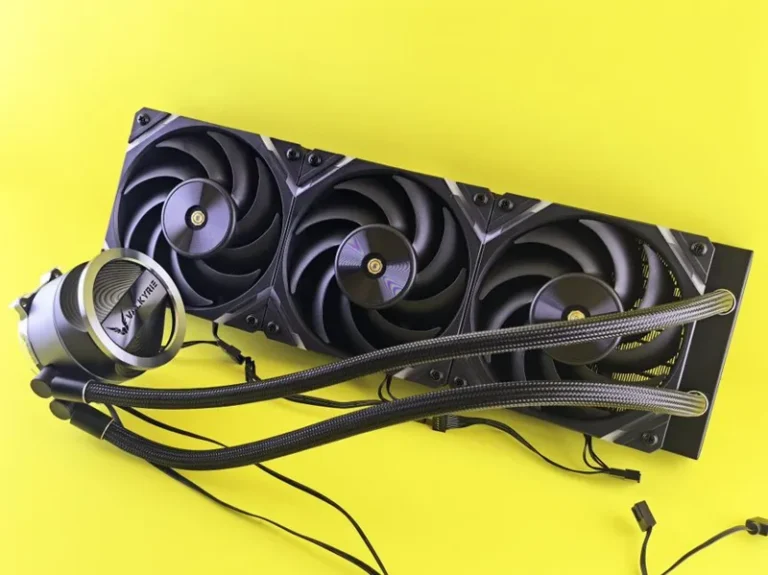
The core idea is simple: liquid moves heat more efficiently than air. Inside an AIO cooler a small pump pushes coolant over a cold plate mounted on the CPU, then out to a radiator where fans blow heat away. A custom loop does the same job but lets you expand the loop to the graphics card, add a reservoir, and choose your own tubing, blocks, and coolant.
For the vast majority of people, an AIO is the smart way to build a water-cooled rig. You get most of the thermal benefit, zero maintenance beyond the occasional dust clean, and a clean look without the plumbing skills a custom loop demands.
AIO Cooler vs Custom Loop
The two approaches are not the same product. An AIO is a consumer part you install in an afternoon; a custom loop is a project that can take a weekend and cost several hundred dollars more.
| Approach | Typical Cost | Maintenance | Risk | Who It Is For |
|---|---|---|---|---|
| Big air cooler | $40–$120 | None | Virtually none | Budget to midrange builds |
| 240–280mm AIO | $80–$150 | None | Very low | Most high-end gaming PCs |
| 360mm AIO | $110–$300 | None | Very low | Flagship CPUs, overclockers |
| Custom loop | $400–$900+ | Fluid change yearly | Low–moderate | Enthusiasts, show builds |
If you just want a cool, quiet gaming PC, a 280mm or 360mm AIO is the sweet spot. A custom loop is for when the building itself is the hobby.
Best AIO Coolers for a Liquid Cooled Gaming PC in 2026
The AIO market has matured, and you no longer have to spend a fortune to get excellent cooling. Here are the units I would actually put in a build today.
Arctic Liquid Freezer III 360 — Best Value
At around $110 to $120, the Arctic Liquid Freezer III 360 outperforms coolers that cost twice as much. It includes a thicker radiator and a small VRM fan that helps motherboard temperatures on air-hungry Intel chips. If you want maximum cooling per dollar, this is the default recommendation for almost any water-cooled build.
Lian Li Galahad II Trinity Performance — Best All-Rounder
Around $150, the Galahad II Trinity Performance runs quiet and looks clean, with a simple pump design that avoids the clutter of a screen. It is a favorite for white and RGB builds and handles a Ryzen 9 or Core Ultra 9 without drama.
NZXT Kraken Elite 360 — Best LCD
At roughly $280 to $300, the Kraken Elite is mostly an aesthetic choice: it adds a crisp LCD screen you can display temperatures or GIFs on, while the underlying cooling is solid rather than chart-topping. Buy it for the look, not raw performance.
Corsair iCUE H150i Elite LCD XT — Best for RGB Ecosystems
Around $290, this is the pick if you already live in the Corsair iCUE ecosystem. The cooling is strong and the screen is genuinely useful for monitoring coolant temperature at a glance.

How Much Does a Water-Cooled Build Cost?
Adding liquid cooling does not have to blow up the budget. A competent water-cooled build with an AIO can land in the same range as a high-end air-cooled machine, because the cooler itself only adds $80 to $150 over a cheap air option.
| Component | Budget Choice | Price | Enthusiast Choice | Price |
|---|---|---|---|---|
| CPU | Ryzen 7 9800X3D | ~$480 | Ryzen 9 9950X3D | ~$700 |
| CPU cooler | Arctic Liquid Freezer III 360 | ~$120 | Corsair iCUE H150i | ~$290 |
| GPU | RTX 5070 Ti | ~$750 | RTX 5080 | ~$1,150 |
| RAM | 32GB DDR5-6000 | ~$100 | 64GB DDR5-6000 | ~$200 |
| Motherboard | B650 ATX | ~$180 | X870E ATX | ~$400 |
| Case | Lian Li Lancool 216 | ~$100 | Fractal Torrent | ~$200 |
| PSU | 850W gold | ~$130 | 1000W platinum | ~$200 |
| Total | ~$1,860 | ~$3,140 |
The $1,900 build is a genuinely excellent 1440p and 4K gaming machine, and the AIO is only about 6% of the whole bill. Liquid cooling is no longer a luxury tax.
Air vs Liquid: Which Should You Choose?
For most CPUs, a large air cooler like the Thermalright Peerless Assassin 120 SE at $40 or the Noctua NH-D15 at $120 will match a midrange AIO on raw temperatures and beat it on long-term reliability, since there is no pump to fail.
Liquid pulls ahead when you run a flagship chip hard. A 360mm AIO can hold a Ryzen 9 9950X or Intel Core Ultra 9 at lower temperatures and lower fan noise under sustained all-core load than even the best air coolers. For a deeper breakdown, our AIO vs air cooler comparison covers the exact numbers.
For most midrange gaming builds, a good air cooler plus a quietest pc build mindset is genuinely the better value. Reserve liquid for flagship hardware, small cases with poor airflow, or aesthetics.
Maintaining a Water-Cooled Gaming PC
One of the biggest myths is that liquid cooling requires constant upkeep. A modern AIO is completely sealed and needs nothing beyond keeping the radiator free of dust, which you should do with a can of compressed air every few months.
AIO Maintenance
- Dust the radiator fins monthly; a clogged radiator hurts more than a hot CPU.
- Keep the pump below the top of the radiator when possible so air bubbles settle away from the pump.
- Expect an AIO to last five to seven years before the pump wears out or fluid slowly permeates.
Custom Loop Maintenance
If you go custom loop, plan for a full drain and fluid replacement once a year, plus occasional cleaning of acrylic blocks that develop micro-fractures over time. This is real upkeep, and it is the main reason custom loops remain a niche.

Signs You Should (and Should Not) Go Liquid
Go liquid when you run a 250W-class CPU, overclock, build in a compact case, or simply want a quieter system under load. Skip it when you are on a strict budget, because that $120 AIO could instead buy a faster GPU or a larger SSD.
Water cooling is a tool, not a status symbol. Spending on the cooler should never come at the expense of the graphics card, which delivers the actual gaming performance. Check our best GPU for gaming price to performance before you splurge on cooling.
FAQ
Is a liquid cooled gaming PC better than an air cooled one?
For flagship CPUs it runs cooler and quieter under sustained load, but for midrange chips a good air cooler is often equal and more reliable long term.
How often do I need to refill liquid cooling?
A sealed AIO never needs refilling. A custom loop should be drained and refilled roughly once a year as the fluid degrades.
Can liquid cooling leak and destroy my PC?
Modern AIOs rarely leak because they are factory sealed, though no system is 100% immune. Custom loops carry more risk from user-installed fittings, which is why careful assembly matters.
Is a 240mm or 360mm radiator better?
A 360mm radiator has meaningfully more surface area and cools better for flagship CPUs. A 240mm or 280mm unit is plenty for most gaming chips and fits more cases.
Do I need liquid cooling for a Ryzen 7 9800X3D?
No. The 9800X3D is efficient and runs great on a large air cooler, though many builders add a 280mm AIO for lower noise and looks.
Conclusion
A liquid cooled gaming PC is more accessible than ever: a $120 AIO bolts on in an afternoon and tames even the hottest flagship CPUs while running quieter than air. Custom loops remain the enthusiast playground, beautiful but demanding real maintenance. Decide based on your CPU, your case, and how much you value silence — then spend the real money on the GPU.
For verified test data and benchmarks, Tom’s Hardware and Gamers Nexus are the references I trust for cooler reviews. If you are still planning the rest of the machine, start with our best gaming PC build 2026 and how much does it cost to build a gaming PC guides.