Fanless Gaming PC: How to Build a Completely Silent Rig
A fanless gaming pc sounds like a contradiction. Gaming hardware runs hot, and every mainstream graphics card ships with two or three fans strapped to a thick heatsink. Yet a small group of builders has proven that a genuinely fanless system — zero spinning parts in the entire case — is possible if you are willing to trade away top-tier frame rates. This guide walks through the parts that make a passive build work, what it costs, and the honest performance ceiling you should expect in 2026.
The appeal is simple: a machine that produces exactly zero noise, collects far less dust, and never suffers a dead fan bearing. If you have ever recorded audio, streamed from a sensitive microphone, or just hated the whine of a small chassis fan, a fanless gaming pc is the one build that removes the problem entirely rather than muffling it.
What Is a Fanless Gaming PC?
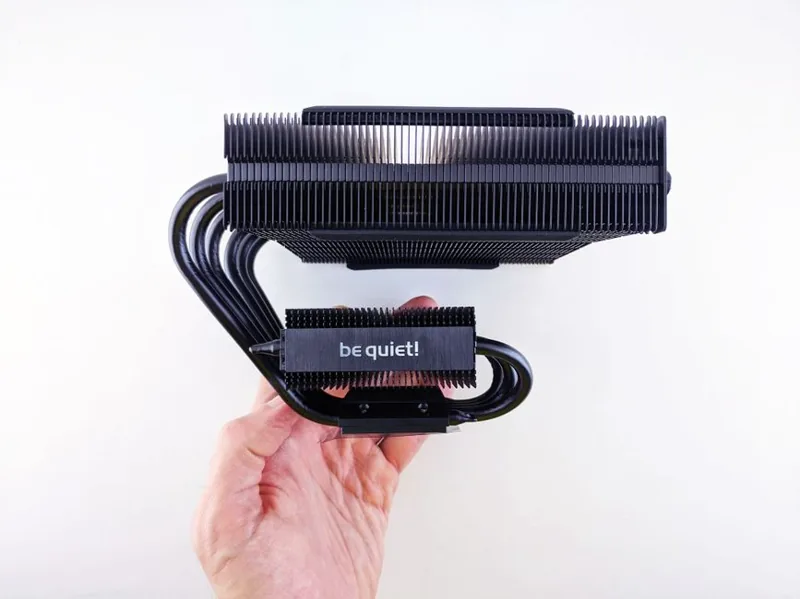
A fanless gaming pc is a desktop built so that none of its components use an active fan. Instead of forcing air across fins with a motor, every heat source relies on passive cooling: large metal heatsinks, heat pipes, the natural convection of warm air rising, and occasionally the case itself acting as a giant radiator. There are no case fans, no GPU fans, no power-supply fan, and no CPU cooler fan.
The challenge is entirely thermal. A typical mid-range gaming rig can dump 300 to 500 watts of heat under load, and passive coolers are rated for a fraction of that. Serious fanless builds therefore target efficient components, undervolt where possible, and lean on cases engineered for passive airflow.
Why Go Fanless? The Real Benefits
The advantages go beyond silence. A fanless gaming pc:
- Makes zero noise. No bearing hum, no coil whine from spinning fans, no air turbulence. The loudest part is the coil whine of the power delivery, and that is usually inaudible.
- Stays clean. Without fans pulling air in, dust has no forced entry path. You can run for a year or more before a wipe-down.
- Never wears out fans. Fan bearings are the most common mechanical failure point in a PC; remove them and that failure mode disappears.
- Reliable in dusty or dirty spaces. Workshops, garages, and studio floors are brutal on fan machines, but fine for passive ones.
The trade-offs are real, and you should hear them plainly: lower performance per dollar, larger and heavier hardware, and a hard ceiling on what you can push. This is a project for people who value silence over maximum frames.
Parts That Make a Fanless Build Possible
Four components decide whether a fanless gaming pc is even feasible.
The Case Becomes a Heatsink
Passive cases such as the Streacom DB4, the HDPLEX H5, and the MonsterLabo “The First” route heat pipes from the CPU and GPU directly to the aluminum side panels. The case body is the radiator. These are not cheap — expect $250 to $600 — but they are the foundation of every serious silent build.
A Low-Wattage CPU
You want a processor that performs well while sipping power. AMD’s Ryzen 7 9700X (65 W TDP) and the energy-focused Ryzen 5 9600X are strong candidates (see AMD’s Ryzen desktop lineup), and the older Ryzen 7 5700G is a favorite because its integrated graphics remove the need for a dedicated passive GPU. Intel’s Core i5-14400 is another efficient option.
A Truly Passive GPU
This is the hardest part. True fanless discrete cards are rare. Palit makes the KalmX series (historically GTX 1650 and RTX 3050-class), and some builders use the ASUS Noctua-style cards with the fans removed and a custom heatsink. In most cases, a fanless gaming pc either uses a KalmX card for light gaming or an APU with integrated graphics.
A Fanless Power Supply
Seasonic and HDPLEX sell fanless units rated up to 500 W–700 W. The PSU dumps its heat through the case walls, so ventilation matters. A quality fanless PSU avoids the single most annoying sound source in a “quiet” build that got everything else right.
Fanless Build vs a Quiet Air-Cooled PC
If silence is your goal, you have two paths: go fully passive or build a nearly-silent air-cooled rig. Here is how they compare.
| Factor | Fanless Gaming PC | Quiet Air-Cooled PC |
|---|---|---|
| Noise at idle | 0 dB | 18–25 dB |
| Noise under load | 0 dB | 28–40 dB |
| Peak GPU power budget | ~75–90 W (passive card) | 300 W+ |
| Typical gaming target | 1080p low–medium | 1440p high |
| Build cost (comparable) | $1,100–$1,600 | $1,000–$1,400 |
| Dust buildup | Minimal | Moderate |
| Maintenance fans | None | Every 6–12 months |
A quiet air-cooled build with premium Noctua fans is far more capable for gaming. A fanless gaming pc wins only when absolute zero noise is non-negotiable.
A Realistic Fanless Gaming PC Build and Cost
Here is a concrete parts list for a light-gaming passive system in 2026, using real products and realistic street prices.
| Component | Model | Approx. Price (USD) |
|---|---|---|
| Case | HDPLEX H5 / Streacom DB4 | $300 |
| CPU (65 W) | AMD Ryzen 7 9700X | $319 |
| Motherboard | B650 Mini-ITX | $180 |
| GPU (passive) | Palit KalmX RTX 3050 | $210 |
| RAM | 32 GB DDR5-6000 | $95 |
| SSD | 1 TB NVMe PCIe 4.0 | $70 |
| PSU | Seasonic Fanless 520 W | $180 |
| Total | $1,354 |
This rig handles esports titles like Valorant, CS2, and Fortnite at 1080p without issue, and lighter story games at reduced settings. It will not run Cyberpunk 2077 at ultra, and it was never meant to.
Cooling Performance and Thermal Limits
Passive cooling works by spreading heat and letting it rise. Expect a few hard limits on a fanless gaming pc:
- Sustained CPU load tops out around 65–88 W before throttling, depending on the case and heatsink mass.
- GPU load is capped near 75–90 W, which is exactly what passive KalmX cards are specced for.
- Ambient temperature matters enormously. A room at 30°C (86°F) cuts your thermal headroom versus a 21°C room.
- Orientation and airflow matter. These cases rely on convection, so keep the vent path clear and never stuff the build into a closed cabinet.
In practice, a well-built fanless gaming pc idles in the 38–45°C range and peaks in the mid-70s under sustained load — warm but stable.
Who Should (and Shouldn’t) Build One
Build a fanless gaming pc if you record audio, stream with a condenser mic, need a bedroom or studio machine that runs overnight, or simply hate noise more than you love maximum frames.
Skip it if you play demanding modern AAA games, want high refresh-rate 1440p or 4K, or have a limited budget where every dollar should buy performance. For most gamers a good best gaming pc build 2026 with quality fans is the smarter spend — and if you want silence without going fully passive, start with best power supply for gaming pc and a silent cooler rather than a full passive rebuild.
FAQ
Is a fanless gaming PC actually silent?
Yes. With no fans anywhere in the system, there is no fan noise at all. The only possible sound is faint electronic coil whine, which most units never produce.
Can a fanless PC play modern AAA games?
Only at reduced settings and resolutions. A passive RTX 3050-class card can run many games at 1080p low-to-medium, but it will struggle with the most demanding titles and cannot deliver high-refresh 1440p.
How much does a fanless gaming PC cost?
Expect roughly $1,100 to $1,600 for a capable light-gaming passive build. The specialized passive case, SSD-style heatsinks, and fanless PSU all carry a premium over standard parts.
Do fanless PCs overheat?
Not if built correctly. They run warmer than active builds but stay within safe limits for low-wattage parts. Ambient room temperature and clear ventilation are the two biggest factors.
Is a fanless PC worth it over a quiet fan PC?
Only if you need true zero noise. A quality quiet build with premium fans gets within a few decibels of silence while delivering enormously more gaming performance per dollar.
Conclusion
A fanless gaming pc is a specialized tool, not a mainstream recommendation. If absolute silence is your priority — for streaming, recording, or a bedroom rig — the passive approach eliminates noise at the source instead of hiding it. Just set expectations: light 1080p gaming and efficient parts, not 4K ultra. For everyone else, a well-built quiet system offers far better bang for the buck. If you are ready to plan your own silent build, check our guide to best budget gaming pc build under 1000 and pick components that keep noise as low as their thermals.