Best Graphics Card for 1440p Gaming in 2026: Top Picks
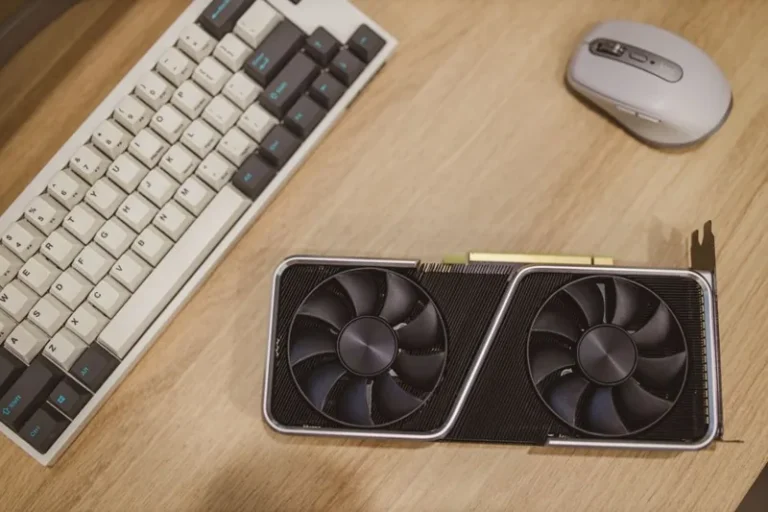
Finding the best graphics card for 1440p gaming in 2026 is easier than it has been in years, because the market finally has strong options at every price point. 1440p has become the sweet spot for PC gaming: it looks dramatically sharper than 1080p but does not demand the brute force that 4K requires. Most mid-range cards now handle it comfortably at high refresh rates.
The right card for you depends on two things: what frame rate you want and how much you are willing to spend. A $250 card will run 1440p at 60 FPS with tuned settings, while a $700 card will push 1440p well past 144 FPS at max settings with ray tracing on. This guide covers the best picks in each budget tier, with realistic expectations for each one.
How We Picked These Cards
Every card below is judged on three things that matter at 1440p: raw rasterized performance, enough VRAM to hold high-resolution textures, and price-to-performance value. At 1440p, 12 GB of VRAM is the comfortable minimum for new games, and 16 GB gives you headroom for the next few years.
We also weighted ray tracing and upscaling support. DLSS and FSR are now effectively mandatory for high-refresh 1440p, so cards with strong upscaling deliver far better real-world results than their raw numbers suggest.
Best Graphics Card for 1440p Gaming: Top Picks Table
| Card | Price (2026) | VRAM | 1440p performance | Best for |
|---|---|---|---|---|
| NVIDIA RTX 5070 Ti | ~$750 | 16 GB | 120–165 FPS | Max settings, high refresh |
| AMD Radeon RX 9070 XT | ~$600 | 16 GB | 100–150 FPS | Best overall value |
| NVIDIA RTX 5070 | ~$550 | 12 GB | 90–130 FPS | Balanced 1440p |
| AMD Radeon RX 9070 | ~$500 | 16 GB | 85–125 FPS | Great value, ray tracing |
| NVIDIA RTX 5060 Ti 16GB | ~$450 | 16 GB | 70–100 FPS | Solid mid-range pick |
| AMD Radeon RX 9060 XT | ~$400 | 16 GB | 65–95 FPS | Best budget with headroom |
| Intel Arc B580 | ~$250 | 12 GB | 55–75 FPS | Cheapest 1440p entry |
The Best Overall: AMD Radeon RX 9070 XT
If you want one card that does everything at 1440p without overspending, the RX 9070 XT is the pick. At around $600, it delivers frame rates that used to require a $900 card, and its 16 GB of VRAM means you will not hit texture limits in demanding titles.
It comfortably exceeds 100 FPS at 1440p in most games and handles ray tracing far better than AMD’s previous generation. Paired with a high-refresh 1440p monitor, it is the card most builders should buy in 2026.
The Best High-End Pick: NVIDIA RTX 5070 Ti
For gamers who want maximum settings, ray tracing, and 144 FPS or higher, the RTX 5070 Ti is the top choice. Its DLSS 4 upscaling and multi-frame generation push frame rates well beyond what raw performance would suggest, and it is the strongest 1440p card that still makes financial sense before you cross into overkill territory.
At around $750, it is expensive, but it will stay relevant for years and handles even the heaviest ray-traced titles at 1440p without breaking a sweat.
The Best Value: NVIDIA RTX 5070
The RTX 5070 sits in the middle of the stack and hits the value sweet spot. At roughly $550 with 12 GB of VRAM, it runs almost everything at 1440p above 90 FPS and supports the full DLSS 4 feature set. Twelve gigabytes is fine today, though it may need a settings tweak in a few years for texture-heavy games.
The Best Budget Options
Not everyone needs 100-plus FPS. If you are happy at 60 to 80 FPS with high settings, two cards stand out.
The Radeon RX 9060 XT at around $400 is the strongest budget card with 16 GB of VRAM, which is unusual at this price. It is a great choice for high-quality textures and future-proofing on a budget.
The Intel Arc B580 at roughly $250 is the cheapest card worth considering for 1440p. It manages 60 FPS in most titles at high settings and punches well above its price. Driver support has matured significantly since Arc launched, making it a genuine budget option rather than a gamble.
How Much VRAM Do You Need for 1440p?
VRAM matters more at 1440p than at 1080p because textures are larger. In 2026, 8 GB is the floor and will force compromises in newer games. Twelve gigabytes is the comfortable minimum, and 16 GB is the safe choice if you keep a card for four or five years.
If you plan to use high-resolution texture packs or play heavily ray-traced titles, buy 16 GB. If you upgrade every couple of years, 12 GB will serve you fine.
Matching Your CPU to a 1440p GPU
A fast GPU needs a CPU that can keep up, especially at high frame rates. At 1440p, the CPU matters less than at 1080p, but a weak processor can still cause stutter and wasted GPU performance. Our best budget CPU for gaming guide covers the processors that pair well with these cards without overspending.
Memory also plays a role in smoothness. If your platform is getting old, our DDR4 vs DDR5 gaming comparison explains whether a memory upgrade is worth it alongside your new GPU.
Related Guides
For independent benchmarks and reviews, see the latest hardware testing.
Frequently Asked Questions
What GPU do I need for 1440p 144Hz?
For 144 FPS at 1440p in demanding games, look at the RTX 5070 Ti or RX 9070 XT. For esports titles, a cheaper card like the RX 9060 XT will hit high frame rates easily.
Is 8GB of VRAM enough for 1440p?
It is the minimum. Eight gigabytes works for many games today, but newer titles increasingly want 12 GB or more at 1440p, so 12 to 16 GB is the safer buy.
Is the RTX 5070 good for 1440p?
Yes. The RTX 5070 is an excellent 1440p card that exceeds 90 FPS in most games and supports DLSS 4 for even higher frame rates.
Should I buy a 1440p card if I have a 1080p monitor?
A 1440p-class card will run 1080p at very high frame rates, so it is a fine buy if you plan to upgrade your monitor soon. Otherwise, you may be overspending.
Is 1440p worth it over 1080p?
For most people, yes. 1440p is noticeably sharper, and modern mid-range GPUs handle it easily. It is the best balance of image quality and performance.
Conclusion
The best graphics card for 1440p gaming in 2026 depends on your budget, but the market has a strong answer at every tier. The RX 9070 XT is the best all-round pick, the RTX 5070 Ti is the high-refresh king, and the Arc B580 proves that even $250 can get you into 1440p.
Match the card to your monitor’s refresh rate and your CPU, and you will get years of smooth gaming. Before you commit, check our guide on when to upgrade your graphics card to make sure you time the purchase well, and our best budget CPU for gaming roundup to complete the build.