RTX Comparisons: How Every Nvidia GPU Stacks Up in 2026
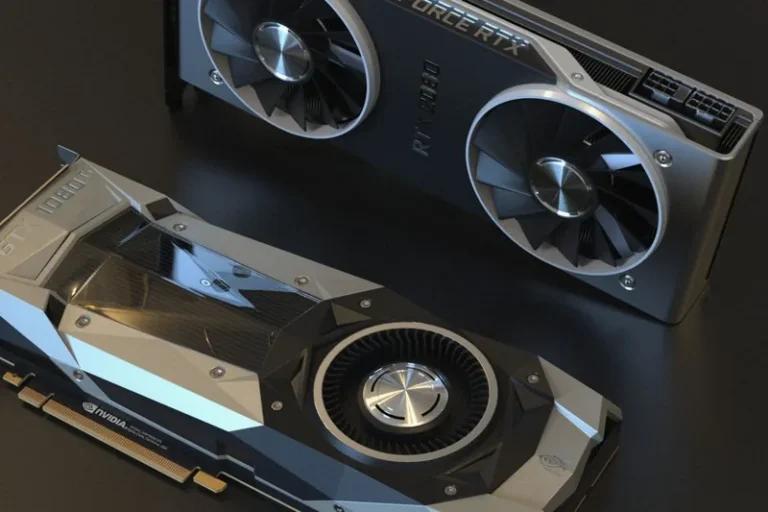
Shopping for a graphics card means wading through an alphabet soup of model numbers, and honest RTX comparisons are the fastest way to cut through the confusion. Whether you are deciding between a budget RTX 5060 and a flagship RTX 5090, or trying to figure out how a card from the 40-series compares to one from the 50-series, understanding what to measure turns a sea of options into a clear shortlist. This guide lays out the full RTX lineup, explains the specs that actually matter, and gives you a framework for making your own comparisons instead of relying on marketing.
RTX Comparisons: The Specs That Actually Matter
Most RTX comparisons get too focused on one number, usually CUDA cores, and miss the bigger picture. The metrics that genuinely predict a card’s performance are VRAM capacity and bus width, total memory bandwidth, architecture generation, and TDP, alongside the feature set like DLSS version and ray-tracing cores. CUDA core count matters, but it only tells part of the story, because a newer card with fewer cores can outrun an older card with more of them. When you sit down to compare, weigh the whole spec sheet rather than a single column.
The Full RTX Lineup, Ranked by Tier
Nvidia organizes the RTX family into clear tiers, and knowing where each card sits is the fastest shortcut in any set of RTX comparisons. Here is the current 50-series stack with the previous-generation equivalents, so you can see how the naming maps to real capability:
| Tier | 50-Series | 40-Series Equivalent | VRAM | Typical Role |
|---|---|---|---|---|
| Flagship | RTX 5090 | RTX 4090 | 32GB / 24GB | 4K native + creator work |
| High-end | RTX 5080 | RTX 4080 | 16GB | 4K high refresh |
| Upper-mid | RTX 5070 Ti | RTX 4070 Ti | 16GB | 1440p/4K balanced |
| Mid-range | RTX 5070 | RTX 4070 | 12GB | 1440p sweet spot |
| Budget | RTX 5060 | RTX 4060 | 8GB | 1080p to 1440p |
The pattern is consistent throughout the lineup: each new generation delivers roughly a tier’s worth of extra performance at a similar price point, which is why a mid-range 50-series card often matches or beats a high-end card from the prior generation. Official specifications for every model live on NVIDIA’s GeForce page.
Generation vs Generation: 30, 40, and 50 Series Compared
Generational RTX comparisons are where most buyers get tripped up, because raw spec sheets do not translate cleanly across architectures. The jump from the 30-series to the 40-series added far more efficient ray tracing and DLSS Frame Generation, while the move to the 50-series introduced DLSS 4 Multi-Frame Generation, which multiplies displayed frame rates on supported titles. In practice this means a 5060 can produce smoother gameplay than an older 3080 in some games, even though the 3080 has more raw compute. Always compare within a generation first, then use a separate mental model for cross-generational leaps.
RTX vs GTX: A Comparison Worth Making Once
One of the more common RTX comparisons happens before you even reach the RTX lineup, and it is the RTX versus GTX question. GTX cards like the GTX 1660 or 1650 are older designs without ray-tracing cores or DLSS support, and they are now poor value for anyone playing modern games. Our dedicated guide on RTX vs GTX comparison chart walks through why even an entry-level RTX card destroys a GTX counterpart in everything from raw frames to feature support. The short version is that in 2026, buy RTX.
How to Run Your Own RTX Comparisons Before Buying
You do not need pro hardware to compare two cards accurately. Start by checking independent benchmarks from Tom’s Hardware or PC Gamer, which publish per-game frame rates at 1080p, 1440p, and 4K. Then look at your own monitor’s resolution and refresh rate, because a card that is overkill at 1080p can be underpowered at 4K. Finally, factor in VRAM, since modern titles increasingly require more than 8GB for high settings. This three-step approach turns any GPU decision into a rational, data-driven one.
Price-to-Performance: The Metric That Ends Most Debates
Raw performance is only half the story, and the other half is what you pay for it. Some RTX comparisons reveal that a card ten percent faster costs fifty percent more, which is a terrible deal for almost everyone. This is where a price-to-performance view matters, and it is exactly the lens we use in our best GPU for gaming price to performance guide. As a rule, the upper-mid tier delivers the best balance, while the flagship tier charges a steep premium for a diminishing slice of extra frames.
Choosing the Right RTX Card for Your Resolution
Your monitor should drive the decision, not the marketing. For 1080p gaming, a budget RTX 5060 is more than enough, and spending more buys frames you will never see on a 60Hz panel. For 1440p, the RTX 5070 is the sweet spot, with the 5070 Ti adding headroom. For 4K and high refresh rates, the 5080 and 5090 earn their price, though the 5080 covers most people comfortably. If you are still picking a display, our best graphics card for gaming 2026 and best gaming monitor 2026 guides pair the two halves of the equation.
When RTX Comparisons Should Point You to an Upgrade
Sometimes the best comparison is the one between your current card and its successor. If you are still on a 20-series or 30-series card and your favorite games struggle at your target resolution, a jump to a matching 50-series tier will usually double your frame rate and add DLSS 4. Our when to upgrade your graphics card guide walks through the telltale signs, but the rule of thumb is simple: if your card can no longer hold 60 fps at your resolution on medium settings, it is time to move up.
RTX Comparisons: Desktop vs Laptop GPUs
One distinction that trips up a surprising number of buyers is the desktop-versus-laptop version of a card that shares the same name. An “RTX 5070” inside a laptop is not the same silicon as the desktop RTX 5070, because mobile chips are heavily power-limited and often carry fewer CUDA cores, which means their RTX comparisons land a full tier or more below what the shared branding implies. If you are weighing a laptop GPU against a desktop build, confirm the actual power budget, core count, and VRAM configuration rather than trusting the sticker alone. The gap appears across generations too, where a mobile 40-series part can trail a desktop 50-series card despite looking comparable on paper, so always benchmark the specific model you are buying, not the family name it happens to share.
FAQ
What do RTX comparisons actually measure?
They measure the specs and performance that matter most, including VRAM, bandwidth, architecture, ray-tracing capability, DLSS support, and real-world frame rates at your target resolution.
Are RTX comparisons only about raw performance?
No. The best RTX comparisons weigh price-to-performance, your monitor’s resolution and refresh rate, and VRAM needs, not just a single benchmark number.
How do I compare an RTX 40-series card to a 50-series card?
Compare them by tier rather than by name, and factor in the extra DLSS 4 Multi-Frame Generation that 50-series cards offer. A mid-range 50-series card often matches a high-end 40-series card.
Is it worth comparing RTX to GTX in 2026?
Only once. GTX cards lack ray-tracing cores and DLSS, making them poor value for modern gaming, so any RTX card in the same tier will comfortably outperform them.
Final Verdict
Good RTX comparisons are less about finding the single “best” card and more about matching a card to your resolution, budget, and upgrade cycle. Learn the tier structure, weigh price against performance, and let your monitor dictate the decision, and you will rarely overspend. Armed with the lineup breakdown above, you can now cut through the noise and land on the exact Nvidia card your build needs, whether that is an entry-level 5060 or a flagship 5090.