What Is a Good PC to Buy for Gaming in 2026? (A No-Fluff Guide)
If you are trying to answer what is a good pc to buy for gaming, the honest answer is that it depends far more on your budget and the games you play than on any single “best” machine. A good gaming PC is one that holds a smooth, consistent frame rate at your monitor’s resolution on the titles you actually launch every week, without forcing you to pay for performance you will never use. This guide cuts through the marketing and gives you a concrete answer at three price points.
The short version: a $700-to-$900 build is great for 1080p, a $1,200-to-$1,600 build is excellent for 1440p at high refresh rates, and a $2,000-plus build is where 4K and heavy simulation titles start to make sense. Everything else below explains how to land in the right tier.
What Is a Good PC to Buy for Gaming? The Short Answer
Before you spend a single dollar, frame the question around three things: your target resolution, your target frame rate, and the games you care about most.
Match the Build to Your Monitor
A gaming PC that outruns its monitor is wasted money. If your screen is 1080p 60 Hz, a mid-range card already gives you everything that display can show. If you own a 1440p 240 Hz monitor, you need substantially more CPU and GPU headroom to actually see the extra frames.
Know Your Games
Competitive shooters like Valorant and Counter-Strike 2 run on modest hardware, while flight simulators, ray-traced single-player titles, and 4K open-world games demand far more. Deciding what is a good pc to buy for gaming for you starts with the software you will actually run, not the software you imagine running someday.
Buy for Today, Leave a Path to Upgrade
The smartest buyers pick a platform with an upgrade path, such as an AMD AM5 or Intel LGA 1851 motherboard, so a future GPU or CPU swap does not require a full rebuild.
Set a Realistic Budget Before You Buy
Most people underspend on the graphics card and overspend on a fancy case and RGB. A healthy budget allocates roughly 40 to 50 percent of the total to the GPU, because that component drives the biggest visible difference in gaming performance.
Here is a practical breakdown of what your money should buy at each tier.
| Tier | Best Use | Recommended GPU | Recommended CPU | Typical Total Price (USD) |
|---|---|---|---|---|
| Budget | 1080p 60-144 Hz, esports | RTX 5060 / RX 9060 | Ryzen 5 9600X | $750-$900 |
| Mid-range | 1440p 100-240 Hz | RTX 5070 / RX 9070 XT | Ryzen 7 9800X3D | $1,300-$1,650 |
| High-end | 4K 60-144 Hz, simulators | RTX 5080 / RX 9070 XT | Ryzen 7 9800X3D | $2,000-$2,500 |
These price ranges reflect typical 2026 street pricing, not launch MSRPs, and you can shift them up or down by $100 depending on sales and regional availability.
The Parts That Matter Most in a Good Gaming PC
Not every component deserves equal attention. Here is where to spend and where to save.
Graphics Card First
The GPU is the heart of a gaming PC. For 1080p, an RTX 5060 or Radeon RX 9060 is plenty. For 1440p high-refresh, an RTX 5070 or RX 9070 XT is the sweet spot. Reserve the RTX 5080 and above for 4K or GPU-heavy simulation and ray-traced games. Tom’s Hardware maintains a useful GPU hierarchy if you want to compare models directly.
CPU and Memory
A modern six-core or eight-core processor like the Ryzen 5 9600X or Ryzen 7 9800X3D avoids bottlenecks in most games. Pair it with 32 GB of DDR5-6000 memory, which is now the value sweet spot, and a 1 TB or 2 TB NVMe SSD for fast load times.
Power Supply and Cooling
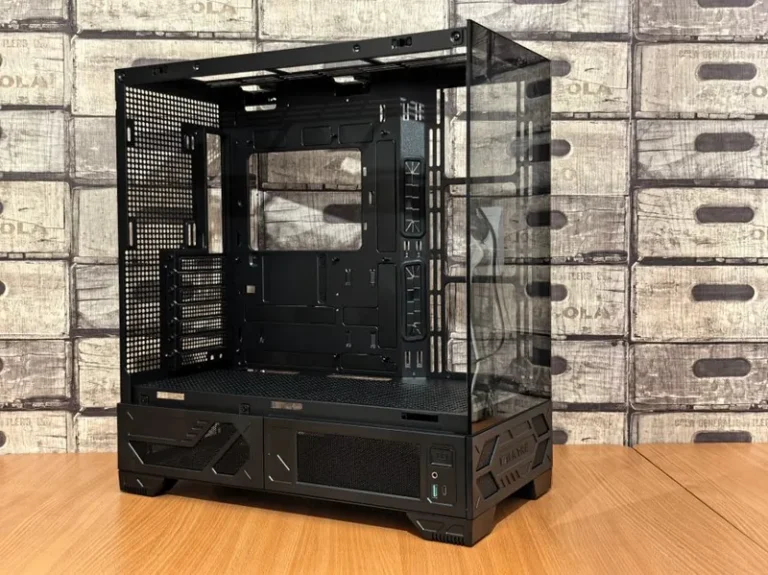
Never cheap out on the power supply. A reputable 650 W to 850 W unit with an 80+ Gold rating protects the rest of your investment. A simple air cooler or 240 mm AIO is enough for most modern CPUs, and a case with a mesh front panel keeps temperatures low.
Prebuilt Versus Building Your Own
If you are comfortable following a tutorial, building your own PC usually saves 10 to 20 percent and gives you better part selection. PC Gamer has a step-by-step build guide that is beginner-friendly.
Prebuilts from established system integrators are a good choice when you want a warranty, professional cable management, and a machine that works out of the box. The trade-off is a higher price for the same performance, so compare the prebuilt’s parts list against a DIY price check before you commit.
Common Mistakes to Avoid When Buying
Buyers waste the most money when they chase a flagship GPU for a 1080p monitor, buy a tiny SSD they will fill in months, or pick a cheap no-name power supply that risks the whole system.
Another trap is buying last generation’s hardware at nearly full price. With current Ryzen 9000 and RTX 50-series parts widely available in 2026, an older CPU or GPU is only worth it at a meaningful discount, and even then it may lock you out of an easy future upgrade.

Understanding Your Upgrade Path
A good gaming PC is also a platform you can grow into. Before you buy, check whether the motherboard and power supply leave room for the upgrades you are likely to want in two or three years.
Choose a Socket With a Future
AMD’s AM5 and Intel’s LGA 1851 sockets both support multiple generations of CPUs, which means a processor upgrade later will not force a new motherboard. Socket longevity is one of the quietest ways to save money down the road.
Oversize the Power Supply and Case
Buying an 850 W power supply today costs only slightly more than a 650 W unit, but it future-proofs you for a bigger GPU later. The same logic applies to a roomy, well-ventilated case: a $90 case with good airflow lasts through several builds, while a cramped one gets replaced the moment you upgrade.
Add Storage as You Go
Start with a single 1 TB or 2 TB NVMe SSD, then add a second drive when prices dip. Storage is the easiest component to expand without touching anything else, so there is no need to overspend on it at the start.
FAQ
What is a good PC to buy for gaming under $1,000?
A build around a Ryzen 5 9600X, an RTX 5060 or RX 9060, 16 GB of DDR5, and a 1 TB NVMe SSD lands under $1,000 and handles 1080p gaming at high frame rates comfortably.
What is a good PC to buy for gaming at 4K?
Plan for an RTX 5080 or RX 9070 XT paired with a Ryzen 7 9800X3D and at least 32 GB of RAM. Expect to spend $2,000 or more, and budget for a quality 4K monitor to actually see the resolution.
How much should I spend on a good gaming PC?
Around $750 to $900 for 1080p, $1,300 to $1,650 for 1440p high-refresh, and $2,000-plus for serious 4K or simulation work. Spending more than your monitor can display is the most common form of overspending.
Should I buy a prebuilt or build my own?
Build your own if you want the best value and control over parts; buy a prebuilt if you prefer a warranty and out-of-the-box reliability. Either is a good gaming PC as long as the component list is balanced.
Do I need a high-refresh monitor for a good gaming PC?
A 144 Hz or 240 Hz monitor is one of the most noticeable upgrades for competitive play, but it only pays off if your CPU and GPU can drive that many frames. Pair a high-refresh display with enough horsepower to use it.
Conclusion
Figuring out what is a good pc to buy for gaming comes down to matching the machine to your monitor, your games, and your budget. The budget, mid-range, and high-end tiers above give you a concrete starting point, and prioritizing the GPU while protecting the power supply is the fastest path to a build you will not regret. For a deeper dive, see our guide to the best gaming PC build of 2026, our best budget gaming PC build under $1,000, and our breakdown of how much it costs to build a gaming PC.