HTPC Gaming Build: A Living-Room PC Guide for 2026
An HTPC gaming build is the best way to get console-style couch gaming with the power, freedom, and game library of a full PC. Short for home theater PC, an HTPC is a compact machine designed to sit in your media cabinet, connect to your living-room TV, and handle everything from 4K gaming to streaming and emulation. The challenge is balancing performance against heat, noise, and size — the three constraints that define a good living-room machine. This guide lays out a complete 2026 part list for an HTPC gaming build, explains the tradeoffs, and covers the setup steps that turn a pile of parts into a seamless couch gaming experience.
Why an HTPC Gaming Build Beats a Console
An HTPC gives you what consoles cannot: your entire Steam, Epic, and Game Pass library in one box, mods, emulators, and the ability to upgrade individual components later. Steam Big Picture Mode and the SteamOS-style interface make navigation with a controller genuinely good, which closes most of the gap consoles once held on ease of use.
The tradeoff is upfront cost and setup effort. A console is cheaper and plug-and-play, but it locks you into a closed ecosystem and paid online multiplayer. If you already own a large PC library or want to emulate older systems, an HTPC gaming build pays for itself quickly. It also doubles as a 4K media streamer that plays local files no streaming box can handle.
Form Factor: The Foundation of the Build
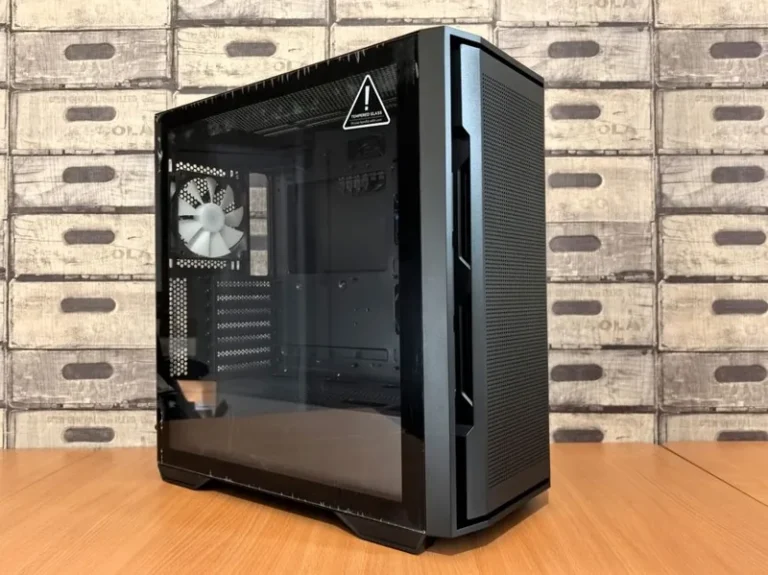
The case is the most important decision in an HTPC, because it determines your cooling, noise, and where the machine can live. For most people, an ITX case in a console-style or compact tower layout is the right call. Popular options include the Fractal Design Ridge, which sits horizontally like a console, and the Cooler Master NR200, a small cube that is easy to build in.
If you already have a media cabinet with limited airflow, choose a case with mesh panels and positive-pressure cooling rather than a sealed unit that will cook itself. Front-vented horizontal cases like the Ridge are ideal because they can sit on a TV stand and pull cool air in from the front while venting out the back. Avoid true rack-mount HTPC cases unless you have an actual AV rack. For a deeper look at compact enclosures, Tom’s Hardware keeps an updated list of the best small-form-factor cases.
The Complete 1440p Living-Room Parts List
This HTPC gaming build targets 1440p at high frame rates on a living-room TV, with enough GPU muscle for 4K upscaling in lighter titles. Prices are late-2026 USD retail:
| Component | Pick | Price (USD) |
|---|---|---|
| CPU | AMD Ryzen 5 7600 | $219 |
| GPU | RTX 4070 (dual-fan ITX) | $549 |
| Motherboard | B650I ITX | $189 |
| RAM | 32GB DDR5-6000 CL30 | $99 |
| NVMe SSD | 2TB Gen4 | $129 |
| PSU | 750W SFX Gold | $139 |
| Case | Fractal Design Ridge | $129 |
| Cooler | Low-profile Noctua NH-L12S | $59 |
| Total | $1,512 |
You can trim this under $1,100 by swapping in a Ryzen 5 5600, a B550I board, and an RTX 3060 Ti for a 1080p-to-1440p machine that still embarrasses a console in most games. The GPU is where your budget flexibility lives — pick the biggest card that fits your case and thermal envelope. If you want a full desktop alternative instead, our best gaming PC build guide covers a higher-performance tower.

Cooling and Noise: The Living-Room Problem
Noise is the enemy of a good HTPC, because the machine sits a few feet from your couch, not under a desk. A loud fan that is acceptable in a home office becomes intolerable during quiet game moments. The fix is a combination of an efficient low-profile cooler, a quiet SFX power supply, and a case with good airflow so fans can spin slowly.
Undervolting the GPU is the single most effective trick for living-room builds. Dropping the voltage on an RTX 4070 by a modest amount can cut fan noise noticeably while losing only a few percent performance. Set a custom fan curve that stays near-silent below 70°C and ramps only when needed. For storage, an NVMe SSD is silent and keeps the build free of spinning hard drives. PC Gamer has a practical guide to GPU undervolting that walks through the software.
Software Setup for a True Console Experience
The software layer is what makes an HTPC feel like a console instead of a PC. Start with Steam Big Picture Mode, or set Steam to launch into it on boot. Enable the Xbox controller driver, and add your non-Steam games and emulators to the Steam launcher so everything is reachable from one controller-driven interface.
For media, install a player like Plex or Jellyfin alongside Kodi, which turns the machine into a full home-theater hub. Set Windows to sign in automatically, disable sleep, and map the Xbox guide button to open the launcher. The result is a machine you can control entirely from the couch with a single controller. Pair it with a wireless keyboard for the occasional desktop task and you are done.
Choosing a Quiet, Reliable Power Supply
An HTPC power supply deserves more thought than most builders give it, because a cheap unit with a loud fan ruins the living-room experience. Look for an SFX or SFX-L unit in the 650W to 750W range with an 80 Plus Gold rating and a zero-RPM fan mode that stays silent at low load. Units from Corsair and Cooler Master in this class are well reviewed.
The zero-RPM mode matters most, since an HTPC spends most of its life at idle or streaming, where the PSU fan should not spin at all. Check that the unit’s cables are flexible enough for an ITX case, since stiff cables make a small build miserable to cable-manage. Our best power supply for gaming PC guide rounds up the quietest, most reliable units on the market today.

Media Server and Emulation Bonus
An HTPC gaming build pulls double duty as the best media server in your house. Point Plex or Jellyfin at your local library and the machine transcodes 4K video to any tablet or phone in the home, something a dedicated streaming stick struggles to match. The same hardware also runs emulators — from NES classics all the way through PS2 and GameCube — through apps like RetroArch and Dolphin, all launched from the same controller interface. That combination of PC gaming, playback, and emulation is exactly what a console cannot offer, and it is the reason a compact HTPC earns its place in a living-room media cabinet far beyond gaming alone.
FAQ
Is an HTPC good for gaming?
Yes. A well-built HTPC gaming build delivers console-style couch gaming with PC performance, game libraries, mods, and emulation, at the cost of higher upfront price and setup effort.
What GPU fits an ITX HTPC case?
Dual-fan cards under roughly 300mm fit most compact cases. The Fractal Design Ridge accommodates a card up to 335mm, which covers most RTX 4070 and RX 7800 XT models.
How do I keep an HTPC quiet in the living room?
Use a low-profile cooler, a quiet SFX power supply with a zero-RPM mode, a mesh case with good airflow, and undervolt the GPU. A custom fan curve that stays near-silent below 70°C helps the most.
Can an HTPC play 4K games?
Yes, if the GPU is strong enough. An RTX 4070 handles 4K in lighter and upscaled titles, while heavier 4K gaming calls for a faster card like an RTX 4080.
Do I need a dedicated sound system with an HTPC?
Not strictly, since audio routes through HDMI to your TV or receiver. For headphones or a dedicated audio chain, a USB DAC is a nice upgrade — see our best DAC for gaming picks.
Bring the PC to Your Couch
An HTPC gaming build turns your living room into the best gaming station in the house. Pick a case that fits your media space, buy a GPU that matches your TV’s resolution, and spend real effort on silence and software so the experience feels as effortless as a console. Once your parts arrive, use our guide on how much it costs to build a gaming PC to sanity-check your budget, and make sure the power delivery is right with our best power supply picks.