SSD vs HDD for Gaming: Load Times, Prices and Which to Buy
The ssd vs hdd for gaming debate is, in most cases, already settled: the SSD wins. If you are building or upgrading a gaming PC in 2026, your operating system and the games you play most should live on a solid-state drive. But hard drives have not disappeared, and for one specific job, they are still the clear value winner. This guide breaks down the real differences with measured load times and per-gigabyte prices so you can spend your storage budget wisely.
The short answer is simple. Buy an SSD for Windows and your favorite games, and add a large HDD only if you need cheap, massive capacity for a big library. I explain exactly why below, with real numbers instead of marketing talk.
SSD vs HDD for Gaming: The Core Differences
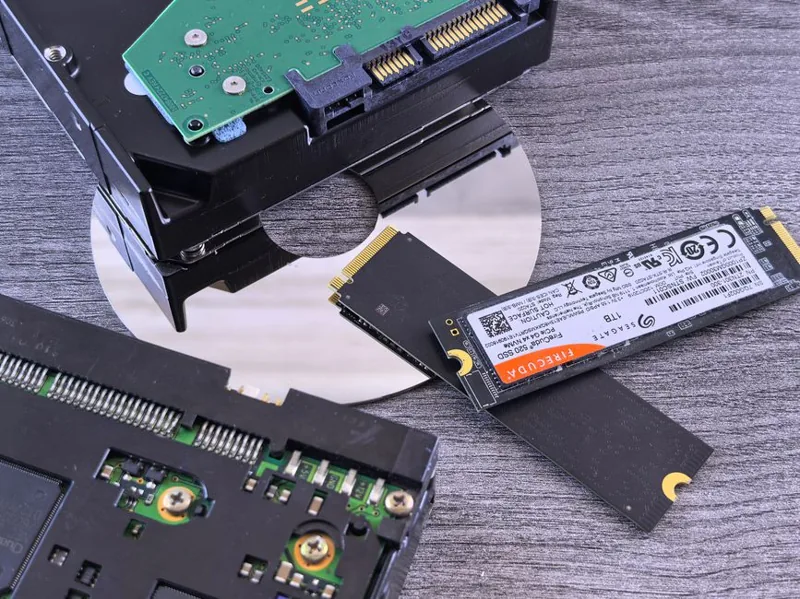
The two drive types work completely differently. An HDD spins metal platters and reads data with a moving head. An SSD stores data in flash memory chips with no moving parts. That single difference explains almost everything about performance and price.
How the technology changes performance
A moving read head can physically reach only one spot at a time, and it has to physically travel across the disk. This is called seek time, and it is the reason hard drives are slow at loading games, which scatter thousands of small files across the platter. An SSD reads any cell nearly instantly.
Why load times differ so much
In practice, an NVMe SSD loads games five to ten times faster than an HDD. A game that takes 45 seconds to load from a hard drive often loads in under 8 seconds from a good SSD. That difference changes how you play. Fast travel, respawning, and quick restarts all feel instant on an SSD.

SSD vs HDD for Gaming: Full Comparison Table
Here is the head-to-head breakdown across the factors that actually matter for a gaming PC.
| Factor | SSD (SATA or NVMe) | HDD | Winner |
|---|---|---|---|
| Game load times | 3–10 seconds | 30–90 seconds | SSD |
| Boot time | 10–20 seconds | 45–90 seconds | SSD |
| Price per GB | $0.06–$0.12 | $0.02–$0.03 | HDD |
| Typical price, 1 TB | $50–$120 | $35–$50 | HDD |
| Typical price, 4 TB | $180–$300 | $80–$120 | HDD |
| Durability (no moving parts) | Excellent | Fragile when running | SSD |
| Noise | Silent | Audible click/spin | SSD |
| Power draw | Low | Higher | SSD |
| Best role | OS + active games | Mass storage / archive | Split |
The table tells a clear story. SSDs win on speed and reliability. HDDs win on raw capacity per dollar. The right setup for most gamers is a combination of the two, not an either-or choice.
When an SSD Is Always the Right Call
Install your operating system on an SSD, end of discussion. Your PC boots faster, applications open instantly, and Windows does not stutter while background tasks hammer the disk. Every gaming PC should start with an NVMe SSD for the OS.
Your most-played games belong on an SSD too. Fast load times are the obvious benefit, but modern games also stream textures from storage while you play. On a slow HDD this causes stutter and “pop-in” in open-world titles, where objects and textures appear late as you move. Games like Cyberpunk 2077, Starfield, and any title marked “SSD required” run poorly on mechanical drives.
For a feature-by-feature guide to the best drive options, check my best nvme ssd for gaming roundup.
When an HDD Still Makes Sense in 2026
Hard drives are not dead; they just moved to a support role. The best case for an HDD is a large library of games you do not play often. A 4 TB hard drive at around $100 stores the same data that would cost $250 or more on an SSD. For Steam users with hundreds of installed titles, that math is hard to argue with.
HDDs also shine for non-gaming bulk storage: game recordings, video clips, mod libraries, and backups. Moving a game between drives in Steam is quick and painless, so the common strategy is to keep active games on the SSD and rotate finished ones to the HDD.
One caveat: some 2025 and 2026 releases now list an SSD as a minimum requirement. Those titles must stay on your solid-state drive regardless.
SATA SSD, NVMe SSD, or HDD: Ranking the Options
If you are confused by the SSD subcategories, here is the quick ranking for gaming:
- HDD — the slowest and cheapest. Use only for bulk storage.
- SATA SSD — around 550 MB/s. Five times faster than an HDD and fine for older games, but outdated for a new build.
- PCIe 4.0 NVMe SSD — 5,000 to 7,000 MB/s. The sensible default in 2026.
- PCIe 5.0 NVMe SSD — up to 14,000 MB/s. Fastest available, but you pay a premium for speed that barely shows up in game loads.
The honest truth is that for gaming, the jump from HDD to SSD is enormous, but the jump from a good PCIe 4.0 drive to a PCIe 5.0 drive is nearly invisible in practice. Load times do not scale with raw throughput once you pass a few thousand MB/s. Spend on capacity, not on the fastest possible interface.
Does Storage Affect Framerate?
Mostly no, with one important exception. Your average fps comes from your CPU and GPU, not your drive. But a slow HDD can cause stutter and frame-time spikes when a game streams assets mid-playback, especially in large open-world maps. An SSD smooths this out. If you are chasing stable framerates, your GPU matters more, which I cover in my best graphics card for gaming 2026 guide.
SSD vs HDD for Gaming: How to Set Up Both Drives
The smartest ssd vs hdd for gaming setup uses each drive for what it does best. Install Windows and your most-played games on the SSD, and point your Steam, Epic, and other game launcher libraries at the hard drive for the rest of your collection.
Setting this up in Windows takes a few minutes. During installation, choose the SSD for the operating system. Once installed, open Settings and set your default storage locations so new downloads and documents land on the hard drive. In Steam, go to Settings, then Storage, and add the HDD as a second library folder. Moving a game between drives is then a one-click job from that same screen.
If you already own a PC with only a hard drive, cloning the OS to a new SSD is the single biggest upgrade you can make. Most drive makers bundle free cloning software in the box. The before-and-after difference in boot and load times feels like buying a whole new computer for the price of one drive. That is the practical answer to the ssd vs hdd for gaming question.
FAQ
Is an SSD really worth it for gaming?
Yes. An SSD cuts load times by roughly 80 percent versus an HDD and eliminates stutter from texture streaming. It is the single most noticeable upgrade you can make to an older PC.
Can I run games from an external HDD?
You can, but load times will be slow and any game that streams assets may stutter. An external SSD over USB 3.2 is a much better choice if you need portable game storage.
How big an SSD do I need for gaming?
A 1 TB NVMe SSD is the recommended starting point in 2026, since many games now exceed 100 GB. A 2 TB drive is the comfortable sweet spot if your budget allows.
Do games load faster on an SSD than an HDD?
Dramatically faster. In tests, the same game loads in roughly 3 to 10 seconds on an SSD versus 30 to 90 seconds on an HDD. The gap widens with bigger, open-world titles.
Does an HDD affect FPS?
An HDD does not lower average fps in most games, but it can cause stutter and hitches when textures stream in. For stable, smooth gameplay, an SSD is the safer choice.
Conclusion
The ssd vs hdd for gaming question has a clean answer: use both, but for different jobs. Put your operating system and active games on an NVMe SSD for fast loads and smooth streaming, and add a cheap HDD only when you need to store a huge library on a budget. If you are building a new PC, start with a 1 TB SSD and expand with a hard drive later rather than the other way around.
For more detail on choosing the right drive, see my best nvme ssd for gaming guide, and if you are planning a full rebuild, make sure you also budget for enough RAM. External sources like PC Gamer and Tom’s Hardware publish regularly updated drive benchmarks worth checking before you buy.